WhatsMarkSaaS Bundle Mobile App
Put WhatsMarkSaaS Bundle in your customers' pockets: a branded mobile app with live chats, campaigns, contacts and analytics, ready to publish under your own name on Google Play.
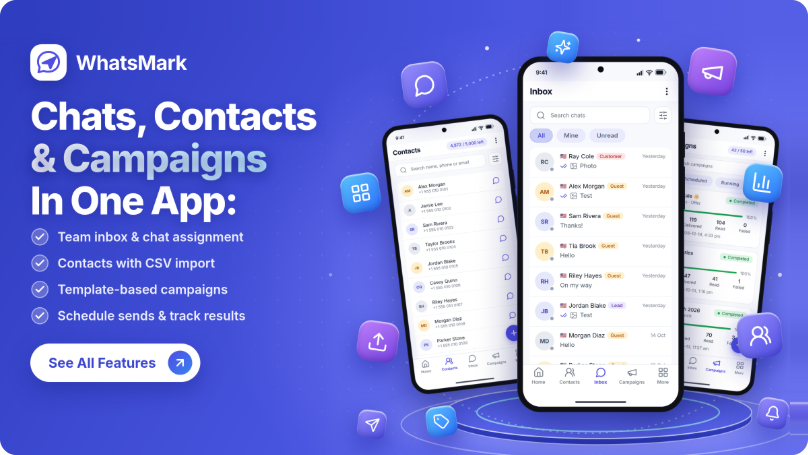
WhatsMarkSaaS Bundle Mobile App is the official companion app for the WhatsMarkSaaS Bundle platform. It gives your customers (and their teams) a fast, native Android experience for the things they do all day: answering WhatsApp chats, checking campaigns, managing contacts and watching their numbers, from anywhere.
It connects directly to your own WhatsMarkSaaS Bundle server. Nothing runs through a third party, and every customer signs in to their own workspace with the same account they already use on the website.
Requires WhatsMarkSaaS Bundle version 1.3.0 or higher and a server on HTTPS. You get the app source code; you do not need to build anything on the server side beyond keeping WhatsMarkSaaS Bundle up to date.
Download the Mobile App
Get the WhatsMarkSaaS Bundle Mobile App directly from the Google Play Store and enjoy managing your WhatsApp conversations, contacts, campaigns and more from your Android device.

Available for Android devices.
What You Get With This App
-
The Complete App Source Code: A clean, typed TypeScript project (Expo and React Native) you can build and publish yourself.
-
Local Builds: Build on your own computer.
Key Features
-
Team Inbox: See every WhatsApp conversation in one list, open a chat and read the full history. Pick the WhatsApp number to view, select several chats at once, assign chats to agents (owners and admins), and delete chats you no longer need.
-
Replying to Customers: Send text, photos, videos, audio, documents, your location or a saved contact, and record voice messages with pause and resume. The app checks every file against WhatsApp's size limits before sending and shows you why one is refused.
-
24-Hour Window Handling: When WhatsApp's 24-hour reply window closes, the app tells the agent and offers Send a template instead of failing silently.
-
Templates: Browse your approved WhatsApp templates, preview them, sync them from Meta, and send one to a customer straight from a chat or a contact.
-
Quick Replies: Insert saved canned replies into the message box in one tap.
-
Contacts and CRM: Search, add, edit and delete contacts, add tags and notes, start a chat from a contact page, and save an unknown number from a chat as a new contact.
-
Contact Import and Export: Upload a contact file, follow the import history and see the results, and export your contacts when you need them.
-
Campaigns: See every campaign and its delivery progress, create a new campaign from a template, then pause, resume, retry or delete it.
-
Home Dashboard: A live overview of messages sent and delivered, campaigns, contacts and approved templates, with 7-day and 30-day views, plus quick actions for the jobs people do most.
-
WhatsApp Connection Status: See at a glance whether the workspace's WhatsApp number is connected, and view its number, phone number ID and business account details.
-
Plan and Subscription Info: Users see their current plan, renewal or trial date and usage, and the app shows a clear notice when a plan limit is reached.
-
Push Notifications: Alert agents about new messages through Firebase Cloud Messaging, and open the right screen when a notification is tapped.
-
Workspace Connection Screen: Every user types their own server domain on first launch (or you lock the app to your domain), so one published app can serve many installations.
-
Sign-in Essentials: Email and password sign-in, forgot password and reset, plus links to your website's registration, privacy policy and terms, which show inside the app.
-
Optional Server Branding: Choose to take the logo, colours and name from the WhatsMarkSaaS Bundle server instead of the built-in brand.
What's Included - App Contents
| Feature | What It Does |
|---|---|
| Team Inbox | Every WhatsApp conversation in one list, with chat history, number filter, select, assign and delete |
| Chat Replies | Text, photos, videos, audio, documents, location, contacts and voice messages |
| Templates | Browse, preview, sync and send approved WhatsApp templates |
| Quick Replies | Saved canned replies inserted in one tap |
| Contacts and CRM | Add, edit, search, tag and add notes to contacts, and start a chat from a contact |
| Contact Import and Export | Upload a contact file, follow the import results, and export contacts |
| Campaigns | View delivery progress, create new campaigns, pause, resume, retry or delete them |
| Home Dashboard | Messages, campaigns, contacts and templates at a glance, with 7-day and 30-day views |
| WhatsApp Connection Status | Shows whether the workspace's WhatsApp number is connected, with its details |
| Plan and Subscription Info | Current plan, renewal or trial date, usage and plan-limit notices |
| Push Notifications | New message and assigned-chat alerts that open the right conversation |
| Staff Permissions | Staff only see and do what their role on the website allows |
| Your Own Brand | Your app name, colours, logo, icon and Android package ID |
| Light and Dark Theme | Follows the phone's setting, in your brand colours |
| Account Deletion | Users can delete their own account from the app |
Requirements
| Needed | Details |
|---|---|
| WhatsMarkSaaS Bundle | Version 1.3.0 or higher, on HTTPS |
| Plan feature | The Mobile App option must be turned on in the server settings and included in the customer's plan |
| Android | Android 7.0 (API 24) or newer |
| To build | Node.js, pnpm, and either an Expo account (cloud) or JDK 17 with Android Studio (local) |
| To publish | A Google Play Console account |
| For push | A Firebase project |
Why Choose This App?
-
Your Brand, Not Ours: Publish under your own name, icon and package ID.
-
Built for Google Play: Account deletion, privacy policy and terms shown in the app, and a guide covering the store steps.
-
Permissions : Staff roles from the website carry over, so people see only what they should.
-
Clear Documentation: